The purpose of this video series is to discuss and demonstration how to use iDempiere Project manage repeatable process, manage project financials, automate the creation of orders from a project and more...
Project Introduction
The below text is copied here for searching purposes.
Purpose
Strong financial project management
Some project mgt scheduling
Some time tracking
No support for task timing and resource loading
Use Case Concepts
Template for repeatable process - multiple concepts
Document automation - creates project foot prints
Example Uses
Capital equipment manufacturing
Sales cycles
iDempiere Project Accounting Time and Materials Services Demo
0:00:00 Introduction
0:00:45 Scenario Review
0:01:15 Create Project
0:02:45 Create Project Phases
0:03:15 Create Project Phase Line - Material
0:04:00 Review Product - Material/Stocked
0:04:45 Review Business Partner
0:05:30 Review Product - Material/Stocked Continued
0:06:00 Phase Line Pricing and Margin
0:06:30 Create Project Phase Line - Service
0:07:00 Review Product - Service/Expense - not stocked
0:08:30 Create Project Phase Line for Installation Phase (service)
0:09:15 Create Project Purchase Order from your Project Phase Lines
0:10:30 Review and complete Purchase Orders
0:11:30 Create Project Material Receipt for Service
0:12:30 Create Project Vendor Invoice for Service
0:13:45 Create Project Material Receipt for Material/Stocked
0:14:30 Create Vendor invoice for Material/Stocked
0:15:30 Note that the Material Receipt posts the Project to the general ledger
0:16:45 Review Project Financial Reports (Balance Sheet and Income Statement) for the Project
0:18:15 Create Project Sales Orders for Project => Phase 1 = Configuration
0:19:00 On Credit Order discussion - Link to Document Types (Sales Order Management - Sales Document Types)
0:19:45 Review Project Shipment created upon Sales Order completion
0:20:45 Review Project Customer Invoice created upon Sales Order completion
0:21:00 Create Project Sales Order for Phase 2 = Installation
0:22:00 Review finished Project Financial Reports (Balance Sheet and Income Statement)
Note: it is possible to tag an invoice line with a specific Phase and a Task (in addition to just the Project). Here are the steps needed to be able to apply an expense against a specific phase or task:
Log in as System client => System Administrator role
Open the 'Invoice (Vendor)' record in the Window, Tab and Field window.
Navigate to the 'Invoice Line' record in the Tab sub-tab and
Navigate to the Field Sequence sub-tab
Find the Phase or Task (or both) fields in the left side of the display and drag them to the right side. Place them next to the Project field.
Navigate to the 'Invoice Line' record in the Tab sub-tab => 'C_Phase_ID' record in the Field sub-tab
Zoom to the Column, check the 'Updatable' checkbox and save the Column record.
Log Out and Log in as your client's admin
Open the Invoice (Vendor), create. complete and post a vendor invoice.
To confirm the phase/task fields posted, open phppgadmin and see the posting
Alternatively, you can update the Accounting Fact Details window to include both the Phase and Task fields.
Project Work Order Demonstration
This video walks you through the process of issuing a project expenses and inventory to the project's WIP account.
0:00:00 Introduction
0:01:00 Create the Project Header
0:02:30 Create the Project's Namesake Product - will use when close Project
0:03:00 Create Project Phase
0:04:00 Create service Phase Line
0:05:45 Create product/material Phase Line
0:06:45 Create AP - Purchase Orders for Project (Generate PO from Project)
0:08:15 Create service Material Receipt from Project Purchase Order
0:11::30 Create product/material Material Receipt from PO
0:13:00 Issue expenses and inventory back to Project WIP
See this example as a reference to add a project tree to your Project window.
The "Standard Phase" field has impacts on the Project Cycle Reporing. Specifically, the link between a Project and a Project Cycle => Step is through the Project's "Standard Phase" field.
The Committed Amount is the amount the customer is willing or committed to pay. This amount is entered at the Project Task or Project Phase.
Project Window - Phase and Task Tab - Field by Field
Notes:
The Committed Amount is the amount the customer is willing or committed to pay. This amount is entered at the Project Task or Project Phase and will be automatically summed at higher levels - all the way to the Project header.
Project Window - Project Line Tab - Field by Field
Generate Sales Order from Project Phase
Generate Purchase Order from Project
Create Project from a Project Template
Project Cycle Reporting
Recommended Project Enhancements
Notes:
There are times when you would not want the project Cycle Reporting limited to a specific Project Type. An example includes creating a report that shows all project (regardless of Project Type) that are in the Initial Phase.
Recommended Project Enhancements Part 2 and Part 3
Coming soon...
Creating a Fixed Asset from a Project with a Asset Balance
The Create Asset from Project process (FA_ProjectCreateAsset) performs the following:
Closes the project
Creates a Fixed Asset from the closed project.
The value of the asset is derived from the project's "Project Balance" field
Note 1: as of this writing (20150109), there is a bug in that the project's "Project Balance" never gets set, and Create Asset from Project fails because the process tries to create a fixed asset of zero value. I spoke with Edwin Ang about this situation. He stated the process came from a special project that the code that sets the "Project Balance" was never committed to the project.
I assume this process is best used for a "Work Order" or "Asset" project where the project holds a balance in the "Project WIP" or "Project Asset" GL account. As a fix, you can manually set the "Project Balance" to the currency adjusted value of the respective GL account, then run the process.
Note 2: the following changes need to occur to the "FA_ProjectCreateAsset" Report & Process record.
C_Project_ID parameter
Removed 1=2 from the display logic
Added the "C_Project_ID" System Element
M_Product_ID parameter -
This parameter was missing
2017-03-30 Project and Time sheet Accounting Discussion
The purposes of this meeting were to (1) create a common understand of project and timesheet accounting and (2) create a road map to make iDempiere a great project/timesheet accounting system.
0:00:00 Introduction
0:03:45 Assumptions
0:05:45 Trial balance of Timesheet entries
0:19:00 discussion of UnEarned Revenue
0:32:00 WIP vs WIP Variance
0:36:00 Delivery of Service
0:40:00 create Expense Report record
0:44:30 create Product (service)
0:46:15 create Project
0:50:00 Issue to Project
0:68:30 needs to make Timesheet accounting more complete/nice
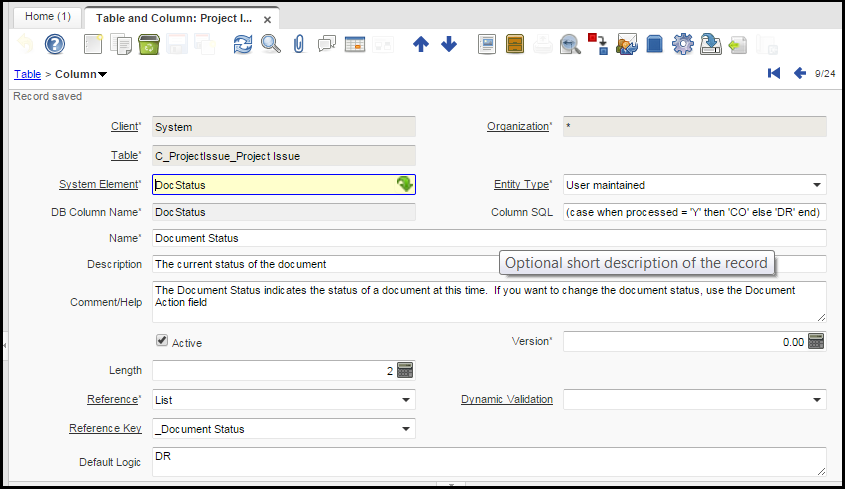
Project Issue Document Status (DocStatus) Column SQL (ColSQL) to Post and View Postings
I had to add a new column to the C_ProjectIssue table named DocStatus. I set the Column SQL field to read "(case when processed = 'Y' then 'CO' else 'DR' end)" - no quotes.
The purpose of this change was to make the system think the document was completed so that you (the user) can post it and see the resulting posting. Otherwise the system would given you an error that reads "Document must be Complete or Closed to view Accounting".